
|
AirPlay for PC - Real-Time Windows Desktop Screen Mirroring to Apple TV & Chromecast using AirMyPC |
Wirelessly mirror your full Windows computer screen and audio to Apple TV, AirPlay 2–enabled TVs, or Chromecast in real time - no Apple TV receiver app required. Turn your TV screen into a wireless interactive whiteboard using the Interactive Tools Suite.
Wirelessly AirPlay mirror your PC/laptop screen to your iDevices & Apple TV
Have you ever wondered how to mirror a Windows PC to Apple TV, Roku TV, AirPlay 2–enabled TVs, or Chromecast?
While iPhones and iPads feature native AirPlay mirroring to Apple TV, Windows PCs require a dedicated AirPlay sender tool.
AirMyPC is a full-fledged AirPlay and Chromecast sender for Windows. It delivers true real-time desktop screen mirroring, letting you broadcast your entire PC display, open applications, mouse cursor, and system audio directly to Apple TV or Chromecast on the same Wi-Fi network without requiring a receiver app to be installed on the Apple TV or Chromecast device.
Note: Unlike simple media file casters or audio-only utilities, AirMyPC performs full real-time screen mirroring for all Windows applications and desktop activity.
Everything runs wirelessly, with zero cabling required. Once installed, AirMyPC streams everything you see on your computer display and hear through your speakers directly to your TV.
Wirelessly cast/AirPlay mirror your Windows PC/laptop sound to your TV, Chromecast, Roku TV, or Apple TV
With AirMyPC you can choose to mirror only the computer's desktop screen, only its audio, or both at once.
Wirelessly cast/AirPlay mirror your webcam to Chromecast, Roku TV, or Apple TV
In addition to desktop mirroring, AirMyPC lets you AirPlay your webcam to your TV. This AirPlay-for-Windows feature lets you stream yourself and your surroundings to your Apple TV or Chromecast devices, including audio from the webcam's microphone.
Turn your TV screen into a wireless interactive whiteboard
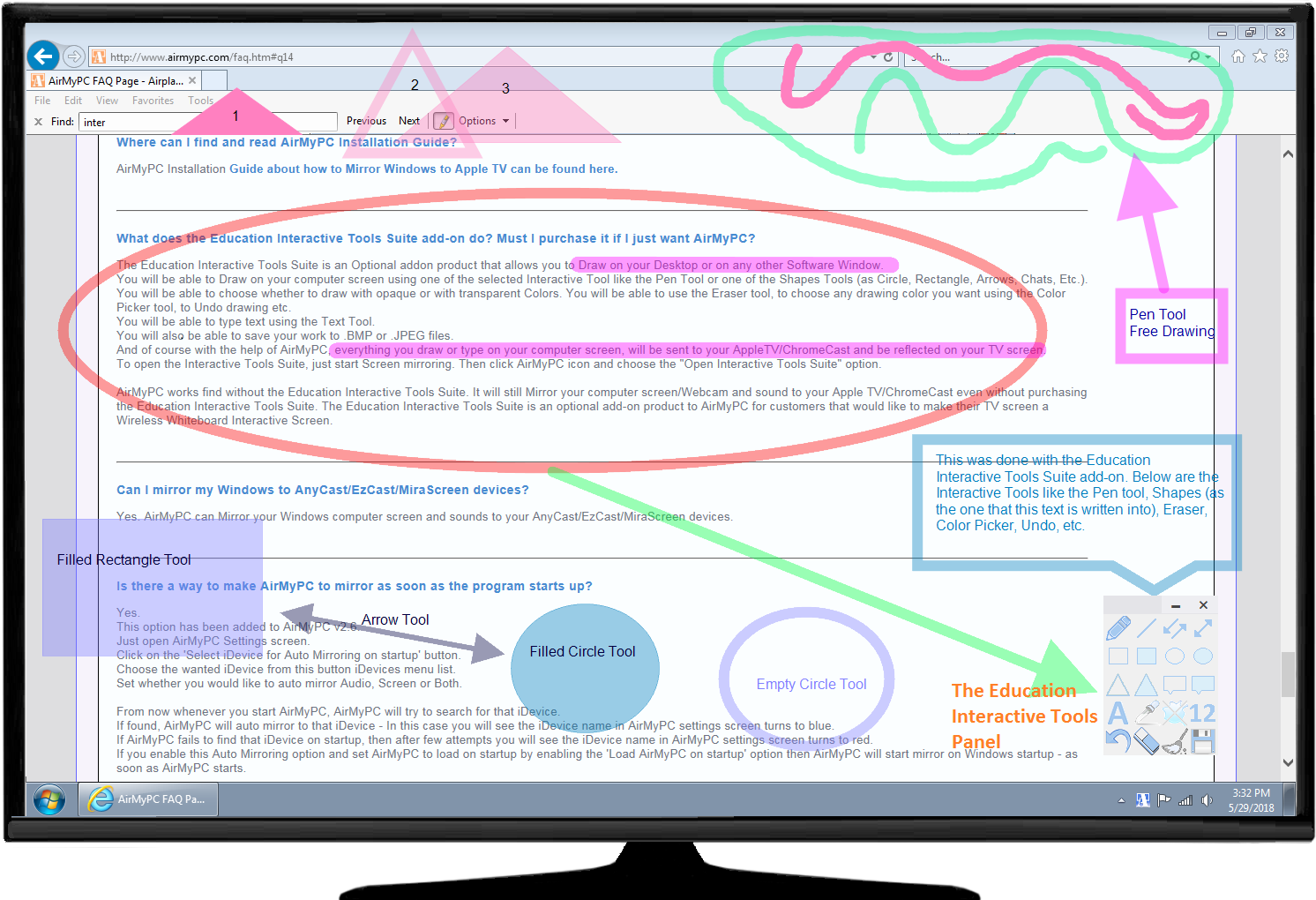
The Education Interactive Tools Suite add-on enhances your experience by turning your TV screen into an interactive whiteboard.
This Education Interactive Tools Suite lets you draw and type on your desktop or on any other open window.
With the Interactive Tools Suite add-on you can draw on your computer screen using
the Pen tool or one of the other shape tools (such as Circle, Rectangle, Arrow, Chat bubble, etc.) with opaque or transparent colors.
You'll also have access to the Eraser tool, the Color Picker tool, the Opacity tool, the Undo tool, and more.
You can type text using the Text tool.
You can also save your work to files.
And of course, with the help of AirMyPC, everything you draw or type on your computer screen is sent to your Apple TV or Chromecast device and reflected on your TV screen (as shown in the TV image below).
* The Education Interactive Tools Suite is an optional add-on. AirMyPC works fine without it, mirroring your PC screen
and webcam to your Apple TV.
Right now, you can get it for only $27.95.
Or get it for $29.95
|
Download AirMyPC
Or get it for $29.95
DON'T WAIT! BUY NOW
Yes, you can mirror a Windows PC to Apple TV - no Apple TV receiver app required.
AirMyPC turns your Windows computer into an AirPlay sender, allowing you to wirelessly mirror your desktop, applications, and system sound to Apple TV and compatible AirPlay 2 devices on the same network.
- Download and install AirMyPC on your Windows PC.
- Click the orange AirMyPC tray icon next to your computer clock.
- Select your Apple TV or compatible AirPlay 2 TV in AirMyPC.
- Start mirroring your Windows desktop, applications, and sound by selecting the "Mirror Screen & Audio" option.
How to Mirror Windows to Apple TV
Frequently Asked Questions
How do I mirror my full Windows desktop screen to Apple TV?
You can mirror your full Windows desktop, display, applications, and system sound to Apple TV using AirMyPC. AirMyPC acts as an AirPlay sender for Windows, casting your entire screen wirelessly over Wi-Fi without needing Apple software.
Can I mirror my Windows screen and sound to Apple TV or Chromecast at the same time?
Yes. AirMyPC can mirror your Windows desktop screen and system sound at the same time to Apple TV, compatible AirPlay 2 TVs, Chromecast, and compatible Google Cast devices over the same network.
Is AirMyPC a real-time screen mirroring app or just a media file caster?
AirMyPC is a full real-time desktop screen mirroring solution for Windows. Unlike media players (such as VLC) that only stream individual video files, or audio-only tools (such as Airfoil), AirMyPC mirrors your complete active PC display, desktop mouse cursor, open software applications, and system audio to Apple TV or Chromecast.
Do I need to install an app on Apple TV to mirror Windows with AirMyPC?
No. AirMyPC works as an AirPlay sender on Windows, so no AirMyPC receiver app needs to be installed on Apple TV. Simply connect your Windows PC and Apple TV to the same network and select the Apple TV in AirMyPC.
Can I mirror a Windows 10 or Windows 11 PC to Apple TV?
Yes. AirMyPC lets you mirror a Windows 10 or Windows 11 PC desktop, applications, and system sound wirelessly to Apple TV and compatible AirPlay 2 TVs over the same network.
Can I AirPlay from Windows to both Apple TV and Chromecast using AirMyPC?
Yes, AirMyPC supports both AirPlay and Google Cast protocols, allowing Windows PC users to mirror screen and sound to Apple TV, Chromecast, Roku TV, or AirPlay 2-enabled Smart TVs.